PROFESSIONAL DESIGN MADE SIMPLE
It instantly communicates coolness and refreshment, which is special in the case of summer.
The effect is a one-premise and creative look because water is creative symbol This is a brand description to explain our fresh quality product. It is based on consumer behavior same like cold drink sprey etc Creativity meets simplicity — we craft visually stunning designs that capture attention, tell your story, and connect your brand with its audience effortlessly. .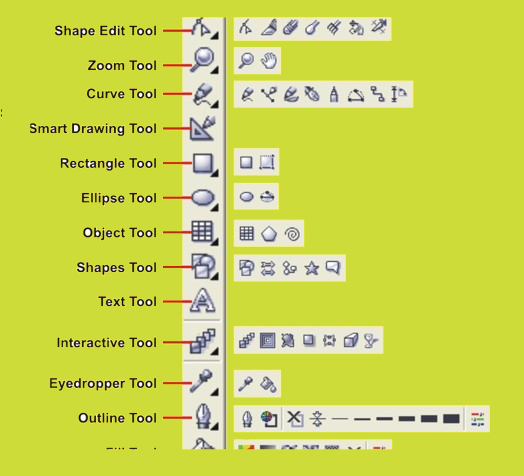
CONCEPT OF CREATIVITY MAKES THE PERFECT DESIGN
Creativity is the heart of perfect design. It transforms simple ideas into visually appealing, original, and meaningful creations. A creative design not only looks beautiful but also communicates messages effectively, solves problems, and connects emotionally with the audience. By blending colors, typography, layouts, and innovation, creativity ensures every design stands out and leaves a lasting impression. The perfect design is born when imagination meets purpose, turning ideas into reality.(1) PICK TOOL: Subject object or groups one selected, you can use the tool to move, stretch, and skew objects
(2) Shape tool: reshapes objects by moving nodes, lines, and control points
(3) Zoom tool: changes the current view of the drawing. You can also access the magnificent option from the proper bar in Zoom mode
(4) Freehand tool: Draw lines and curves. You can also use this tool to trace bitmaps
(5) Smart drawing tool: converts the freehand strokes you draw to basic shapes and smooth curves
(6) Ellipse tool: Draw an ellipse and a circle. Circles are created by holding down the control key as you draw
(7) Graph paper tool: draw a collection of boxes that are similar to a sheet of graph paper
(8) Perfect shapes tool: a collection of objects that you can add to your drawing. They include such things as arrows, stars, talk bubbles, and flowchart symbols.
(9) Text tool: add either artistic or paragraph text
(10) Interactive tool: the blend tool allows you to merge objects together through a series of steps. The flyout gives access to several more interactive tools that are described on the following pages.
(11) Eyedropper tool: The eyedropper tool allows you to select a color within an object . you can also capture the colours for a custmized pallete. the flyout gives acess to the paint bucket that applies the colour